This is a new announcement banner that can be turned on and off

Table of Contents

Debt covenant compliance checklist excel: What to track and how to build one

Lenders and borrowers both rely on the same credit agreement, but tracking whether its terms are actually being met usually falls to whoever owns the compliance file. A debt covenant compliance checklist in Excel is one common way to manage that process: one place to hold every covenant, the threshold it’s tested against, and the current result, so nothing gets confirmed from memory or a scattered set of calculations. Getting the structure right from the start is what keeps that file usable period after period, rather than something that needs to be rebuilt every time a test comes due. 

TL;DR

  • A debt covenant compliance checklist in Excel keeps track of the financial ratios, required actions, and restrictions written into a credit agreement, alongside reporting deadlines the lender expects the borrower to meet.
  • An efficient version separates each covenant into its own row, with columns for the covenant’s description, its threshold, the calculated actual result, the resulting headroom, and a status flag that auto-resolves and the others get a manual Yes/No status with a sign-off.
  • The columns repeat across most versions: covenant name and credit agreement section, covenant type (financial, affirmative, or negative), threshold, actual value, a compliance status flag, testing frequency, and a due date.
  • Each covenant is calculated from a specific set of source documents (financial statements, debt schedules, cash flow data), not tracked as an opinion, so the checklist is only as reliable as the underlying data feeding it.
  • A status flag built with a simple IF formula (comparing actual to threshold) turns a raw ratio into a plain compliant-or-breach result, which is what makes the checklist usable at a glance rather than something that needs manual interpretation every period.
  • Termgrid’s Covenant Monitoring module tests covenants directly from the same capital structure data used elsewhere in the platform.

What is a debt covenant compliance checklist?

A debt covenant compliance checklist is a structured tracking tool used to monitor whether a borrower is meeting the financial and operational restrictions set out in a loan agreement. It maps each covenant defined in the credit agreement- a leverage limit, a minimum liquidity requirement, a reporting obligation- against the borrower’s actual performance for the current period, and records whether that covenant currently passes or fails.

The purpose is preventive as much as it is reporting. A covenant breach, even a minor or technical one, can trigger default provisions, additional lender scrutiny, or a renegotiation of terms. A well-maintained checklist catches a covenant drifting toward breach before the compliance certificate is due, not after.

Who a debt covenant compliance checklist is for

The same core information is useful to two distinct audiences:

  • Portfolio company CFOs and financial managers, who calculate covenant metrics each period and use the current-period results to support preparation of any compliance certificate required under the credit agreement.
  • Lenders and agents, who verify that the borrower’s reported figures match the credit agreement’s definitions and confirm compliance across one or more facilities.

Compliance officers and legal teams also use the checklist as a reference, particularly when a covenant definition includes specific carve-outs or add-backs that need to be applied consistently period over period. 

How to use and run a debt covenant compliance checklist

Running the checklist is a recurring process, not a one-time setup:

  1. Set up the checklist once, with every covenant defined in the credit agreement listed as its own row, including the exact section reference.
  2. At each testing period (monthly, quarterly, or annually, depending on the covenant), pull the current period’s financial statements and any other required data.
  3. Calculate the actual value for each covenant using the credit agreement’s specific definition, not a generic version of the ratio. Many agreements define EBITDA with specific add-backs that differ from a standard accounting definition.
  4. Compare the actual value against the threshold and record a pass or fail status, ideally through a formula rather than manual judgment.
  5. Flag anything approaching the threshold, not just anything already in breach. A covenant with shrinking headroom is useful information even if it technically still passes.
  6. Prepare the compliance certificate from the checklist’s current period results, and route it for sign-off before the deadline in the credit agreement.
  7. Archive each period’s results rather than overwriting them, so the checklist also becomes a historical record of how covenant headroom has trended over time.

Formulas that make the checklist useful

A few formulas turn the checklist from a static list into something that actually tests compliance.

Formula

Calculation

Example threshold

Leverage ratio

Total debt (or net debt, per the agreement)

÷ EBITDA

≤ 3.5x (maximum)

Interest coverage ratio

EBITDA ÷ interest expense

≥ 2.5x (minimum)

Fixed charge coverage ratio (FCCR) The exact formulas and definitions will depend on the credit agreement, but simplified examples include:

(EBITDA − capex − taxes) ÷

(interest expense + scheduled principal payments)

≥ 1.1x (minimum), varies by agreement. Use the exact definition and threshold from your credit agreement.

Headroom

(Threshold − actual) ÷ Threshold (maximum covenant),

or actual − threshold (minimum covenant)

Shows distance to breach, not just pass or fail

Status flag

=IF(E2>D2,”Breach”,IF(E2>D2*0.9,”Watch”,”Compliant”)) 

for a maximum covenant, or the reverse comparison for a minimum covenant

Pair with conditional formatting to auto-highlight breach or near-breach rows

These formulas depend entirely on the actual value being calculated correctly against the credit agreement’s specific definition. A formula applied to the wrong EBITDA figure will still return a clean-looking “Compliant” result; it will just be wrong.

How to build a debt covenant compliance checklist in Excel

The checklist has three parts: an inputs block for the period’s figures, a calculation block that turns those figures into covenant ratios, and a covenant table that tests each ratio against its threshold.

Step 1: Set up the inputs block. In column A, list the figures every covenant test needs: total debt, EBITDA, interest expense, capex, taxes, and scheduled principal payments. Enter each period’s values in column B (B5:B10). These are the only cells you update each period. Use the credit agreement’s definition of EBITDA, including its add-backs, rather than the reported accounting figure.

Step 2: Calculate the covenant ratios. Below the inputs, add one formula per ratio:

  • Leverage ratio (B13): =B5/B6 (total debt ÷ EBITDA)
  • Interest coverage (B14): =B6/B7 (EBITDA ÷ interest expense)
  • FCCR (B15): =(B6-B8-B9)/(B7+B10) ((EBITDA − capex − taxes) ÷ (interest + principal))

Step 3: Build the covenant table. Starting at row 18, add these headers:

Column

Header

What goes in it

A

Covenant name & credit agreement section

e.g., Leverage ratio (Section 7.1)

B

Covenant type

Financial, Affirmative, or Negative

C

Threshold

The limit from the credit agreement

D

Actual

Linked to the calculated ratio

E

Headroom

Distance to breach

F

Status

Compliant or Breach

G

Testing frequency

Monthly, Quarterly, or Annually

H

Due date

Compliance certificate deadline

I

Sign-off

Pending, Signed, or Action needed

Give each covenant its own row. Link the Actual column to the calculation block (for example, D19 =B13) so it updates whenever the inputs change. For covenants based on balances, such as minimum liquidity or a capex limit, enter the actual figure from cash or capex records.

Step 4: Add the headroom and status formulas. The headroom formula depends on whether the covenant sets a maximum or a minimum:

  • Maximum covenants (leverage, capex limit): =C19-D19
  • Minimum covenants (interest coverage, FCCR, minimum liquidity): =D20-C20

Status uses the same formula on every row: =IF(E19>=0,”Compliant”,”Breach”). Positive headroom means the covenant passes. Negative headroom means it is in breach.

Non-financial covenants, such as delivering the quarterly compliance certificate, have no numeric threshold. For those rows, describe the requirement in the Threshold column (for example, “Deliver within 45 days”), leave Headroom blank, and set Status by hand.

Step 5: Add conditional formatting. Select the Status column (F19:F24) and go to Home → Conditional Formatting → Highlight Cells Rules → Text that Contains. Enter “Breach” and choose red fill.

To flag near-breaches, select A19:I24 and go to Home → Conditional Formatting → New Rule → Use a formula. Enter =AND(ISNUMBER(E19),E19>=0,E19<0.1*C19) and choose amber fill. Any covenant within 10% of its threshold is highlighted while it still passes.

Step 6: Add data validation. Select the Covenant type column and go to Data → Data Validation → Allow: List. Enter Financial,Affirmative,Negative as the source. Repeat for Testing frequency (Monthly,Quarterly,Annually) and Sign-off (Pending,Signed,Action needed). Drop-down lists keep entries consistent from period to period.

Worked example. With $90M of total debt, $30M of EBITDA, $10M of interest expense, $5M of capex, $4M of taxes, and $8M of scheduled principal:

Covenant

Threshold

Actual

Headroom

Status

Leverage ratio (max)

3.50x

3.00x

0.50x

Compliant

Interest coverage (min)

2.50x

3.00x

0.50x

Compliant

FCCR (min)

1.10x

1.17x

0.07x

Compliant (amber)

Minimum liquidity (min)

$5.0M

$3.5M

−$1.5M

Breach

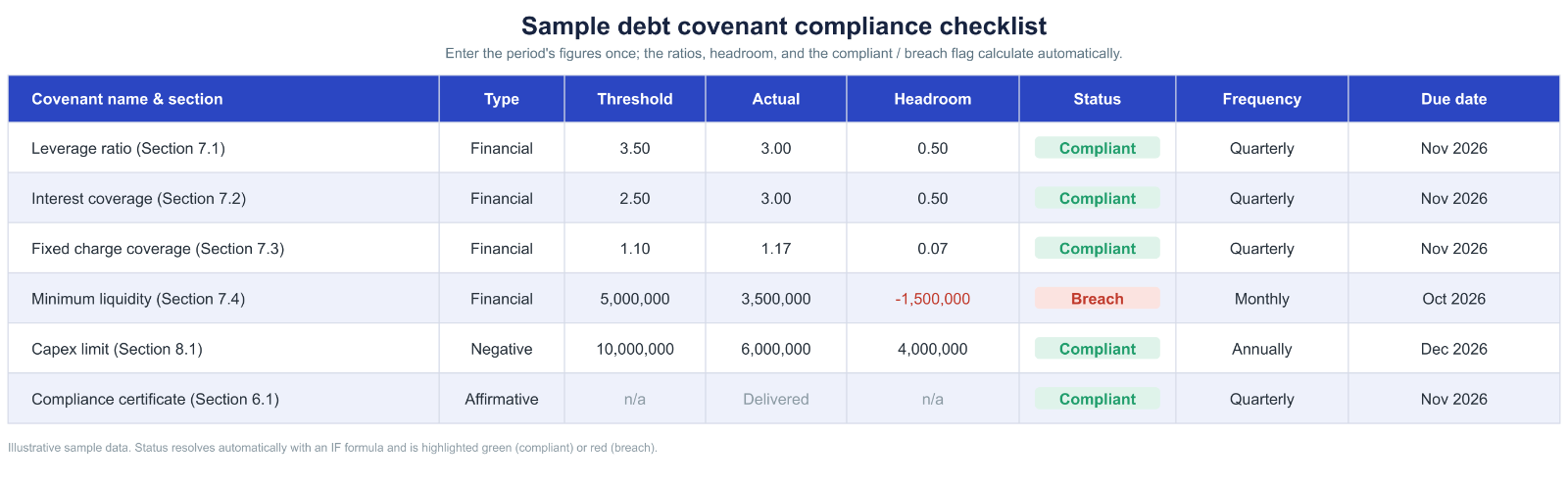
All three ratios pass, but FCCR’s 0.07x of headroom is about 6% of the threshold, so the near-breach rule turns it amber. A small rise in capex or interest would push it into breach. The liquidity covenant has already failed, which needs action before the certificate is due.


Debt covenant compliance checklist template

The template below shows how a covenant compliance checklist works once it is set up in a spreadsheet, with each covenant on its own row, tested against its threshold, and resolved to a plain compliant or breach result. In general context, this is the kind of structure a borrower’s finance team or a lender’s monitoring team keeps for each facility, and it is easy to adapt to the specific covenants and definitions in your own credit agreement.

debt covenant compliance checklist

You enter the current period’s figures once, and the leverage, interest coverage, and fixed charge coverage ratios calculate automatically. Each covenant row then compares its actual value against the threshold, shows the remaining headroom, and flags the result as compliant or breach with an IF formula, so a covenant drifting toward its limit is visible before the compliance certificate is due rather than after.

Get your own debt covenant compliance checklist template

Where the numbers come from: documents to collect for each covenant test

Every covenant calculation depends on a specific set of source documents, and the checklist is only as reliable as this underlying data.

Document

What it provides

Financial statements

Income statement, balance sheet, and cash flow statement for the current testing period, matching the basis (LTM, quarterly, spot) the covenant is defined against

Debt schedule

Outstanding balances, rates, and maturities across all facilities, needed for leverage and coverage ratio calculations

Credit agreement (definitions section)

The exact covenant terms, EBITDA add-backs, and any negotiated exceptions, defined precisely rather than by generic accounting standards

Prior period compliance certificates

Confirmation that the calculation methodology has been applied consistently period over period

Capex and fixed asset records

Required if a covenant includes a capital expenditure limit or ties into a fixed charge coverage calculation

Cash and liquidity records

Required for any minimum liquidity or minimum cash balance covenant

Collecting these once per period, rather than re-deriving them from scratch each time, is what keeps the checklist sustainable as a recurring process rather than a fresh research project every quarter.

Where a spreadsheet checklist breaks down

A spreadsheet can work well for a relatively straightforward covenant-monitoring process. The structural problems show up as the number of covenants, facilities, or people involved grows:

  • Nothing flags an approaching deadline automatically. A spreadsheet shows the due date column, but it doesn’t notify anyone as that date approaches. That responsibility sits entirely with whoever owns the file.
  • Covenant definitions can drift from the credit agreement after an amendment. If a facility is repriced, upsized, or has its EBITDA definition amended, every formula built against the old definition keeps calculating using outdated terms until someone manually finds and updates it.
  • Shared visibility is limited. The borrower typically calculates compliance internally and provides the required reporting or compliance certificate to the lender. Supporting calculations may still need to be exchanged and verified separately.
  • Version control breaks down across multiple facilities or reporting periods. A fund tracking covenant compliance across a portfolio of borrowers, each with their own spreadsheet, has no single view of where risk is concentrated across the book.

None of this is a flaw in the formulas themselves. It’s a structural limit of using a static file to track something that changes every period and depends on staying in sync with a legal document that can itself change.

How Termgrid supports covenant compliance

Termgrid is the platform purpose-built for private capital markets, giving teams a single, structured view of every covenant and its headroom across a portfolio rather than rebuilding the calculation in a separate spreadsheet each period. 

Covenant monitoring is part of Portfolio Management on that platform, built for exactly this kind of period-after-period tracking, with each covenant tied to the same capital structure record as the facility’s terms. 

See how Termgrid’s Portfolio Management works, or request a demo to walk through it with a member of the team.

How a covenant compliance checklist prevents technical default

A technical default can arise from a breach of non-payment obligations under a credit agreement, such as failing to meet a covenant or reporting requirement, subject to any applicable cure periods or other provisions in the agreement. Some technical defaults, particularly those caused by missed deadlines or calculation errors, can be avoided through disciplined covenant monitoring.

It catches drift before it becomes a breach. Tracking headroom, not just pass or fail, shows a covenant trending toward its limit while there’s still time to address it, through cost adjustments, a waiver request, or advance notice to the lender.

It keeps the calculation consistent with the credit agreement’s actual definition. A checklist that references the specific section and add-back rules for each covenant reduces the risk of a calculation error that either overstates compliance (a real problem) or understates it (an unnecessary false alarm).

It creates a record for reporting deadlines. A missed compliance certificate deadline is independent of whether the underlying financial performance would have passed. A checklist with due dates and sign-off tracking directly addresses this.

It surfaces cumulative risk across multiple covenants. A borrower might be comfortably within limits on leverage but tight on interest coverage. Tracking every covenant in one place, rather than checking them individually, makes that kind of combined risk visible.

Frequently asked questions

1. What formulas are used in a debt covenant compliance checklist in Excel?

The core formulas are the ratio calculations themselves (leverage ratio, interest coverage, FCCR), a headroom calculation (threshold minus actual), and a status flag built with an IF statement that returns a compliant or breach result based on that comparison.

2. What columns should an M&A due diligence checklist include?

At minimum: covenant name and credit agreement section, covenant type (financial, affirmative, or negative), threshold, actual value, status, testing frequency, and due date. Many checklists add a headroom column and a sign-off field for the compliance certificate.

3. How does Termgrid calculate covenant compliance instead of using manual Excel formulas?

Termgrid’s Covenants module tests each covenant directly against the facility’s capital structure data, rather than requiring someone to export financials and rebuild the ratio calculation in a spreadsheet each period.

4. How does Termgrid track upcoming covenant tests?

Because covenant testing is tied to the facility’s current terms inside the platform, upcoming tests and their status are visible directly, rather than depending on someone remembering to check a due date column in a separate file.

5. How does Termgrid keep covenant thresholds in sync with the credit agreement after an amendment?

Covenant definitions and thresholds are tied to the same capital structure record used elsewhere on the platform. When a facility is amended, that record updates once, and the covenant test reflects the new terms directly, rather than requiring a manual formula rebuild.

End-to-end platform for private debt.

Run deals faster. Track covenants in real time. Strengthen portfolio oversight.

$1tn+
Debt financed on platform
$4.8tn
Client AUM
Stay in Touch

Stay in touch

Stay in touch with all of our latest updates and articles.